Age vault: keys, export, and recovery
Create an age key, export and acknowledge a copy, add recovery recipients, and turn encryption on for a backup—before Bro Space or a disk failure makes it urgent.
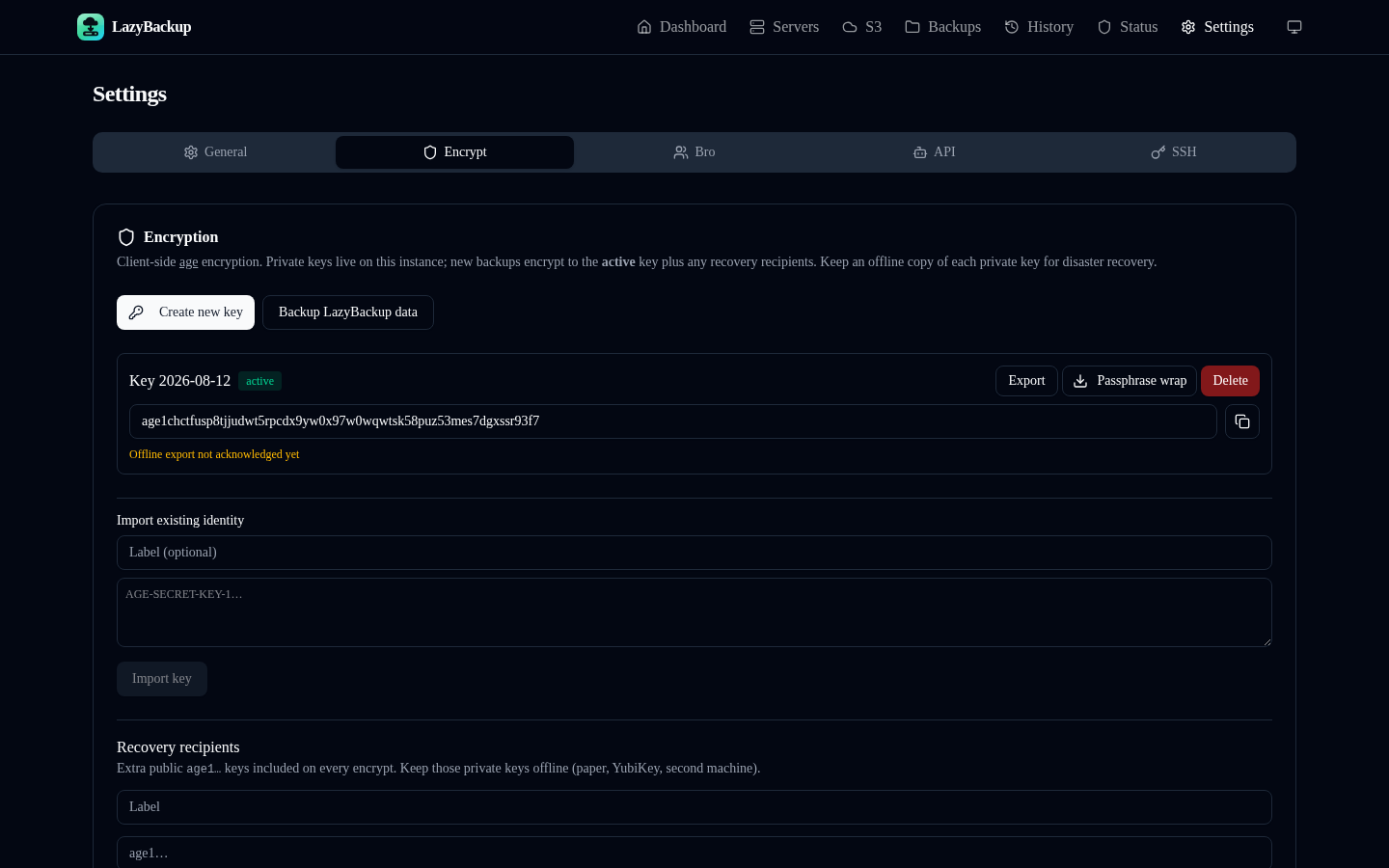
LazyBackup can age-encrypt artifacts before they land on disk, S3, or a Bro peer. Keys live in an instance vault: one active identity for new encrypts, plus retired or compromised keys kept only so old ciphertext can still decrypt. Recovery is extra public age1… recipients added on every encrypt—not a second copy of your private key on this box.
Step 1 — Create a key
- Open Settings → Encryption.
- Generate key (or Create new key if a vault already exists).
- Creating a new key demotes the previous active key to retired. Decrypt still tries every identity in the vault—never a silent overwrite.
Step 2 — Export and acknowledge
Private identities stay on this instance. Export a copy (plaintext or passphrase-wrapped) and store it somewhere you would trust after the box dies. Then acknowledge the export in the UI so Status stops warning. Skip the ack and encrypted/Bro jobs still run—you just have no proof you saved a disaster-recovery copy.
- Plaintext export: the age identity file. Treat it like a password dump.
- Passphrase wrap: same identity, encrypted so a stolen file isn’t immediately usable.
- Ack is a checkbox on this instance, not a second backup of the key.
Step 3 — Recovery recipients
Add extra public age1… keys under recovery recipients. Every encrypt includes the active key plus those recipients. Keep the matching private keys offline (another machine, a hardware token workflow, a printed paper key). They are how you unlock ciphertext if this LazyBackup—and its vault—are gone.
Step 4 — Enable on a job
- Edit a backup (or New Backup).
- Turn on Encrypt with age before land (local, server, or S3 destinations).
- Run once and confirm History shows an encrypted artifact.
You need an active key in the vault first. Instance meta-backups (SQLite + vault + SSH keys) are a different path: optional passphrase wrap, not this age-key encrypt, and never Bro.
Bro Space always encrypts
Peer destinations force encryption. Your friend only ever stores opaque blobs. Create and export a key before you send a Bro invite—the Status page will nag if Bro or encrypt-on jobs exist without an active key.
Lose all identities = gone
- Decrypt uses every vault identity (active, retired, compromised).
- Create new key retires the old one; old backups still decrypt while that retired key remains.
- Mark compromised to stop using a key for new work while keeping it for decrypt.
- If the instance, the export, and every recovery private key are lost, ciphertext cannot be restored. Age has no escrow.
Quick checklist
- Active age key created
- Offline export saved (plaintext or passphrase-wrapped) and acknowledged
- At least one recovery recipient whose private key you hold elsewhere
- Encrypt enabled on jobs that leave this host (required for Bro)